Your phone. Two hops.
Then the internet.
HopHopa is a VPN for Android and iPhone. No account, no email, no traffic logs. Pick a server, tap Connect.
-
Your phone
The HopHopa app opens an encrypted tunnel with one tap. Android 8 or later, iOS 16 or later.
-
Entry server
Your traffic arrives here first, over one of three protocols.
VLESS · XHTTP · RealityHysteria2Shadowsocks-2022 -
Exit server
On chained routes, a second server passes traffic on. Sites see this address, not yours.
WireGuard -
The internet
The app shows the exit IP and live upload and download counters while you are connected.
Sites on the direct list, such as local banks, marketplaces and government services, open without the VPN, so they see your usual connection.
Some routes use one server, some chain two. Every server in the list shows its protocol and ping before you connect.
One screen does the work.
No sign-up screen, no settings to fill in first. The app creates an anonymous session on its own and loads the server list.
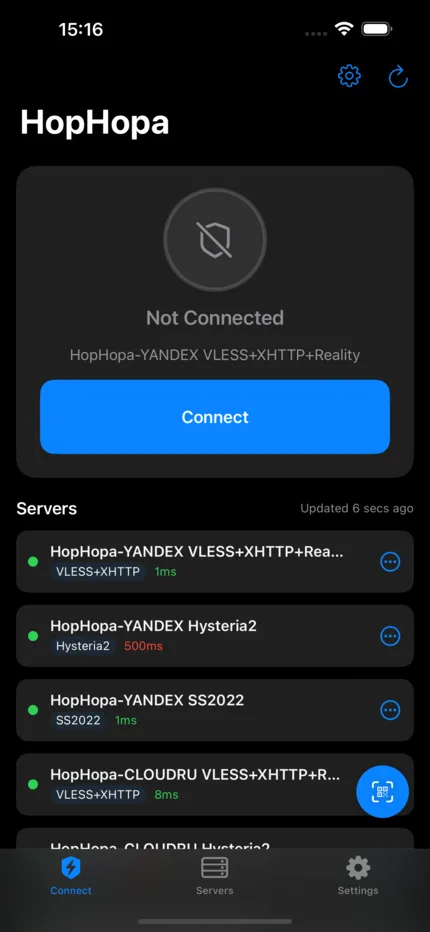
Status and route
Connected or not, and which server and protocol carry your traffic right now.
Connect in one tap
The app picks the default server. Change it any time from the list.
Every server, labelled
Protocol tag and ping on each row, so you can switch to the fastest one yourself.
Bring your own server
Scan a QR code or open a config link. The app asks before it connects to anything you import.
Two modes, two server lists.
I’m here
The everyday mode, for when you are at home. It keeps its own server list and remembers it offline.
Vacation
A separate set of servers for when you travel. Switch modes on the Connect screen, no reinstall and no second account.
What we keep, and what we don’t.
From the privacy policy. It is short, and this is most of it.
Kept on our server
- A random session token
Created on first launch, not linked to your name, device or Apple ID. It only authenticates requests for the server list.
- Whether that session has Premium
A yes or no flag, plus the App Store transaction ID that proves the subscription.
Never collected
- Names, emails, phone numbers
- IP addresses or browsing history
- Device identifiers (IDFA, IDFV)
- Location
- Analytics or crash reports
- VPN traffic content or metadata
Free to start.
Free
No charge
- One server, no time limit
- No account and no ads
Premium
Monthly
- Every server, region and protocol in the list
- iPhone: auto-renewing App Store subscription, the price is shown before you confirm
- Android: open Premium in the app for the current options
Install HopHopa.
Android
- Version
- 1.0.4
- File
- HopHopa-v1.0.4.apk, 76.3 MB
- Needs
- Android 8.0 or later
- SHA-256
4c2aa2307ca38a16e8240ac38e2d7baea4ba64f7b69066ef276fb3832de275e9
- Download the APK on your phone.
- Open it. If Android asks, allow your browser to install unknown apps.
- Launch HopHopa and tap Continue, then Connect.
iPhone
The iOS app is not in the App Store yet. This page will link to it as soon as it is live.
- Store
- App Store, coming soon
- Needs
- iOS 16 or later
Questions people ask.
Anything else: support.
Do I need to create an account?
No. There is no registration, login, email or phone number. On first launch the app makes a random session token and stores it on your phone.
Do you log what I do through the VPN?
No. HopHopa does not log, monitor, inspect or store VPN traffic. The full wording is in the privacy policy.
Which protocols does it use?
VLESS with XHTTP and Reality, Hysteria2 and Shadowsocks-2022 between your phone and the entry server. Chained routes add WireGuard between the entry and exit servers. Each server in the list shows its protocol.
What is the direct lane?
A list of domains that bypass the tunnel, such as local banks, marketplaces and government services. They open over your normal connection while everything else goes through the VPN. The app downloads the list from the HopHopa server.
Why is the Android app an APK file?
For now HopHopa for Android is a direct download from this site. Android asks once for permission to install it. If you want to check the file, compare its SHA-256 with the one listed above.
When is the iPhone app coming?
It is not in the App Store yet, and we would rather not guess a date. This page and the Download button will point to the App Store once it is live.